I grew up in what I call a cast iron family. All the pans were cast iron, we had a few enamel pots for pasta, and one beat up copper bottomed pan for boxed mac and cheese. My mom cooked most days and when she didn’t, it was mac and cheese or pasta because we weren’t allowed to cook with her pans unless she was there.
Cast iron has some mixed reviews, some (me), swear by it and some, think it’s difficult and impossible to cook with…and they’re right to a degree (get it, degree, cooking, farenheit, celcius…sorry), if you don’t know how to care for cast iron, it’s a hassle and a mess. That’s what this post is for though!
Seasoning
Seasoning is the term used to treat and clean cast iron. Even when you buy a new “pre-seasoned” pan, you’re going to want to season it yourself. A major benefit of cooking with cast iron is that it retains flavor, and makes its own seasoning for your food…like magic!
Step 1: Clean your pan with HOT water and a scouring brush, rough side of a sponge, or steel wool. Nothing else…just water and something rough.
Step 2: Dry it completely with paper towels, and then place it on a lit stovetop burner for a minute or so to make sure it’s completely dry.
Step 3: While the pan is warm, probably 10-20 minutes after you remove from stove, (because it retains heat like no one’s business, and I don’t want you to burn yourself) pour some oil* into the pan and spread it around, completely coating the inside. Wipe off excess.
Step 4: Place in the oven set to 200º F, Upside Down for 2 hours
BOOM! Your pan is seasoned and ready to cook with.
*But Barber, what kind of oil? That’s mostly up to you, but canola is the classic standard (vegetable oil) but I use olive oil or canola, depending on what I used last. You can use any vegetable oil you want, whether that’s grapeseed, sunflower or flax seed, but there’s no reason to go crazy and buy a “Cast Iron Care Oil” because that’s literally just a marked up bottle of canola…No Lies.
NEVER USE SOAP WHEN CLEANING YOUR CAST IRON,and here’s why…
Soap is great for clothes, and your body, and even your car, but not for Cast Iron. Cast iron is a porous metal, so when you put something in, it absorbs. When you cook with it regularly, and oil it regularly, it creates its own nonstick surface! It’ll absorb the taste of herbs and spices you cook with regularly, and everything gets a mild flavor boost from whatever you cooked in it previously. When you use soap, it removes that surface and flavor; soap can absorb and flavor your food, and no one wants soapy fritatas.
Now, the seasoning steps above are used when you get a new pan, or need to re-season a rusted pan. It’ll restore it like new. But what about cleaning after cooking something tastey?
Cleaning and Upkeep
Step 1: While the pan is still warm, take rock salt and/or a non-metal brush (like the one above that I use) and go crazy scrubbing it.**
Step 2: Rinse with warm water, and dry with a paper towel (I say paper towel, because it’ll actually raise up some iron, and turn your towel black…better use a disposable towel, or risk staining your nice linens) after that, feel free to put on the stove top for a minute to make sure it’s all dry
Step 3: Coat with a little oil, wipe up excess, and store in your oven or broiler.
Special notes: The heat, salt you use to scrub, and iron itself all equal one great big anti-bacterial surface, so no worries about not using soap and feeling like you’ll get salmonella. Because it’s a porous surface, air drying is a no-no. It’ll lead to rust, and then you’ll have to scrub it off and completely re-season it (refer to first seasoning process).
**When you scrub with salt, it starts picking up iron particles and oil. It’ll start turning black and you can keep it in a jar until you’ve got a good amount, bake it on a sheet to dry it, and there you have classic Black Salt! For more banishing oomph, I scald pepper in a fry pan, and add incense ash to the mix.
… that I couldn’t function without in my fannish life.
I recently did a huge clean out of all the extensions I’ve added to Chrome over the years, and only kept those I rely on a lot. Many of these I wish I’d found sooner, so I thought I’d share. I’ll assume everyone has an ad blocker and Tumblr Savior, and instead talk about ones that may be less well known.
Extensions for tab hoarders
There are lots of tab management extensions for people like me who have 1000 tabs open that I’m really going to read/watch/do any day now I swear.
My preferred solutions are not for proactively keeping tidy and organised, they are for occasionally trying to rein in the chaos because I can’t see what any of the tabs are any more.
There are lots of these, but this one works best for me: it’s easy to view all your tabs, sort tabs, rearrange tabs into windows, search tabs, close tabs, etc, especially as you can select multiple tabs to move.
But, you really get to power up your tab management when you add…
Tab Organizer already has most of this extension’s features, but for me it has one killer feature: Extract this domain. With one click, pull all the tabs from one domain (AO3, I’m looking at you) into their own window.
Unfortunately, Tab Sorter treats Tumblr and DW subdomains as separate domains, so for instance me.tumblr and you.tumblr won’t get extracted together. However, it works for enough sites that it’s easier to deal with the rest of the mess via Tab Organizer.
(You can do the same thing for Tumblr and Dreamwidth in Tab Organizer by searching, selecting all, and then choosing Move to New Window, but this does all that in one click.)
If you’re a tab hoarder, you also probably have a slow Chrome. Something like this helps a lot to keep Chrome from grinding to a halt. What I like about the Great Suspender is that all my tabs are still there, exactly where I left them, and I can reload them all at once if I want. It’s the least effort and the least intrusive of the options I tried.
Extensions which help with RSI
I’ve been fighting bad RSI for years, and it has been incredibly shit for the past year. Among the many, many adaptations I’ve made, these extensions are some of the most valuable, because a lot of my computer time is on the web.
There are tons of extensions that do these things in various shapes and forms. If these don’t work for you, there may well be a similar one that will.
So, what do you do on Tumblr? Scroll, scroll, scroll, scroll, scroll, scroll, scroll. Also, AO3 and news sites: scroll, scroll, scroll, scroll, scroll. Or, page down, page down, page down. It’s pretty repetitive, and for RSI I find these sites the worst.
There are lots of extensions out there which will let you stop and start scrolling automatically. I like Simple Auto Scroll because it has three configurable speeds that you toggle through, so you can speed up until you’re at the right speed. The downside is you have to toggle through all the speeds to get the speed you want, or to slow down, but if you assign a keyboard shortcut to this extension, it becomes pretty painless. My speeds are configured for “dense article”, “AO3″ and “Tumblr”.
This is serious business stuff. Vimium lets you ditch the mouse and use the web almost entirely from your keyboard. You can move through your tabs, click links, open bookmarks, all of that, plus one of my unexpected favourites: scroll a half page up or down. It’s got comprehensive functionality and has a lot of configuration options, so there’s a learning curve, but if you want to go easier on your wrists, or if you just feel quicker on the keyboard, it’s worth the time to get used to it.
Most importantly for me, I now often use dictation to control my computer. Vimium is a tool that cracks open the mouse-centric web and makes it possible for dictation software to get in there and do stuff at my command. It’s like a superpower!
Because getting off the damn computer is a good solution when you’ve got RSI, I’ve tried a lot (””) of different ways to get stories from AO3 onto my Kindle. This one ended up being the best for me. It’s quick and direct, and if you choose Preview & Send, you can edit the title and author to include the info you want visible in your Kindle library (fandom, pairing, etc). It’s not perfect, but I just haven’t found a perfect solution for this task. This one has the least steps for a good enough result.
Now, I just need the Kindle to have the equivalent of tab management tools, sigh.
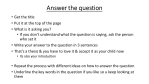
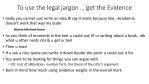
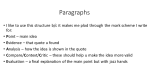
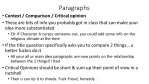
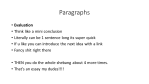
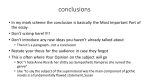
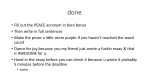
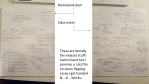
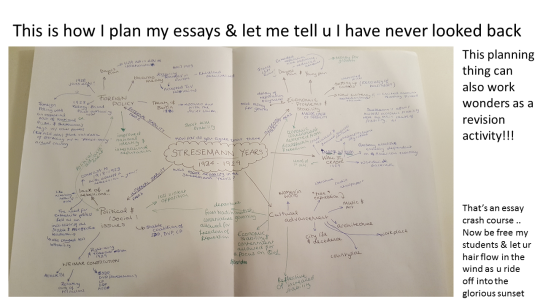
instead of actually writing an essay.. i wrote a thing on how to write an essay (woah meta) & added some pictures of my plans so u can see what i actually mean!! enjoy my friends i hope this is useful to someone
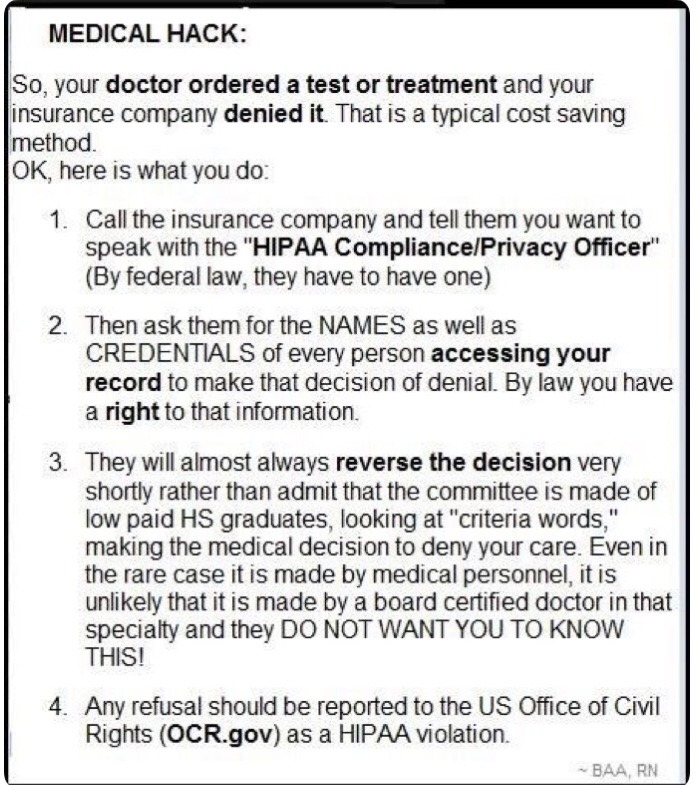
Just an FYI for those in the US with insurance issues
this sounds oddly plausible
a good doctor will pester the insurance company on your behalf. a couple times in my Back Pain Odyssey my insurance noped out on a procedure, and my doctor called them up and was like “no, really” and they gave in.
so if your insurance is in the habit of going “you don’t actually need TWO months of physical therapy, just walk it off,” tell the doctor who ordered it, and they may very well volunteer to, or agree to, call up the insurance people and go “simon says pay for the fucking therapy.”
For all my peeps out there fighting the good fight against Big Pharma Bureaucratic Bullshit.
This past spring some of my friends and colleagues participated in an experiment, bringing a 360 degree camera into the middle of one of our annual Patriot’s Day reenactments. They then made an interactive informational video about the battles of Lexington and Concord. The best part is, you can rotate the view at any time while you’re watching. This is as close to the real thing as you can get!




 326 Miles